Customer Page-by-Page Guide
This inventory reflects the current customer route tree and the live loan behavior verified during the 2026-03-25 documentation refresh.
Evidence and Access
- Portal:
https://customer.test.emali2.damplabs.com
- Live screenshot evidence:
output/playwright/refresh-20260325/
- Verified customer account:
customer1 / password
- Primary implementation references:
emali2-frontend/apps/customer-portal/src/App.tsxemali2-frontend/apps/customer-portal/src/pages/LoansPage.tsxemali2-frontend/apps/customer-portal/src/hooks/useApi.ts
Public and Session Routes
| Route |
Access |
Current Behavior |
/ |
Public |
Session-aware entry point. Signed-in customers are redirected into the protected workspace. |
/login |
Public |
Customer sign-in entry. In the test environment this can show a Continue With Password handoff before IAM. |
/register |
Public |
Customer onboarding route for new-account creation. |
/forbidden |
Public |
Explicit denial page for blocked routes or failed role checks. |
Wallet, History, and Self-Service Routes
| Route |
Access |
Current Behavior |
/app |
Customer |
Dashboard with wallet summaries, quick actions, recent activity, and loan-at-a-glance content. |
/app/wallet |
Customer |
Alias route that redirects to /app/my-wallets. |
/app/my-wallets |
Customer |
Wallet portfolio view with wallet balances, masking, and handoffs into money-movement flows. |
/app/transactions |
Customer |
Searchable customer ledger for wallet activity. |
/app/statements |
Customer |
Statement generation and reconciliation against transaction history. |
/app/profile |
Customer |
Profile and account-management workspace. |
/app/settings |
Customer |
Alias route that resolves to the profile/settings surface rather than a distinct page. |
/app/notifications |
Customer |
Customer-facing operational alerts and notices. |
/app/help |
Customer |
Support and help-entry route for customer issues. |
Payments and Transfers
| Route |
Access |
Current Behavior |
/app/transfer-money |
Customer |
P2P transfer flow with fee and total preview before submission. |
/app/pay-bills |
Customer |
Bill-payment flow with biller/account reference capture. |
/app/merchant-payment |
Customer |
Merchant and till payment flow, including handoff into QR when appropriate. |
/app/buy-airtime |
Customer |
Airtime and bundle purchase flow for self or other numbers. |
/app/qr-payments |
Customer |
QR payment and scan-based payment entry. |
/app/mobile-to-bank |
Customer |
Wallet-to-bank transfer route. |
/app/invoices |
Customer |
Invoice review and payment handling. |
Savings, Credit, and Community
| Route |
Access |
Current Behavior |
/app/loans |
Customer |
Unified borrowing and servicing view. Prioritizes current live loans above new offers. |
/app/savings-goals |
Customer |
Savings-goal creation and contribution tracking. |
/app/budget |
Customer |
Budget setup and spend-versus-limit monitoring. |
/app/investments |
Customer |
Investment and portfolio overview surface. |
/app/group-wallets |
Customer |
Group wallet listing and contribution entry points. |
/app/contributions |
Customer |
Contribution campaign directory. |
/app/contributions/:campaignId |
Customer |
Campaign-specific contribution detail route. |
/app/currency-exchange |
Customer |
FX conversion workflow where enabled. |
/app/rewards |
Customer |
Reward and loyalty summary route. |
/app/ai-assistant |
Customer |
AI-assistant workspace. |
/app/whatsapp |
Customer |
WhatsApp-linked customer service route. |
Security Route
| Route |
Access |
Current Behavior |
/app/security/2fa |
Customer |
Live two-factor status and setup entry backed by centralized identity. |
Dashboard Reference
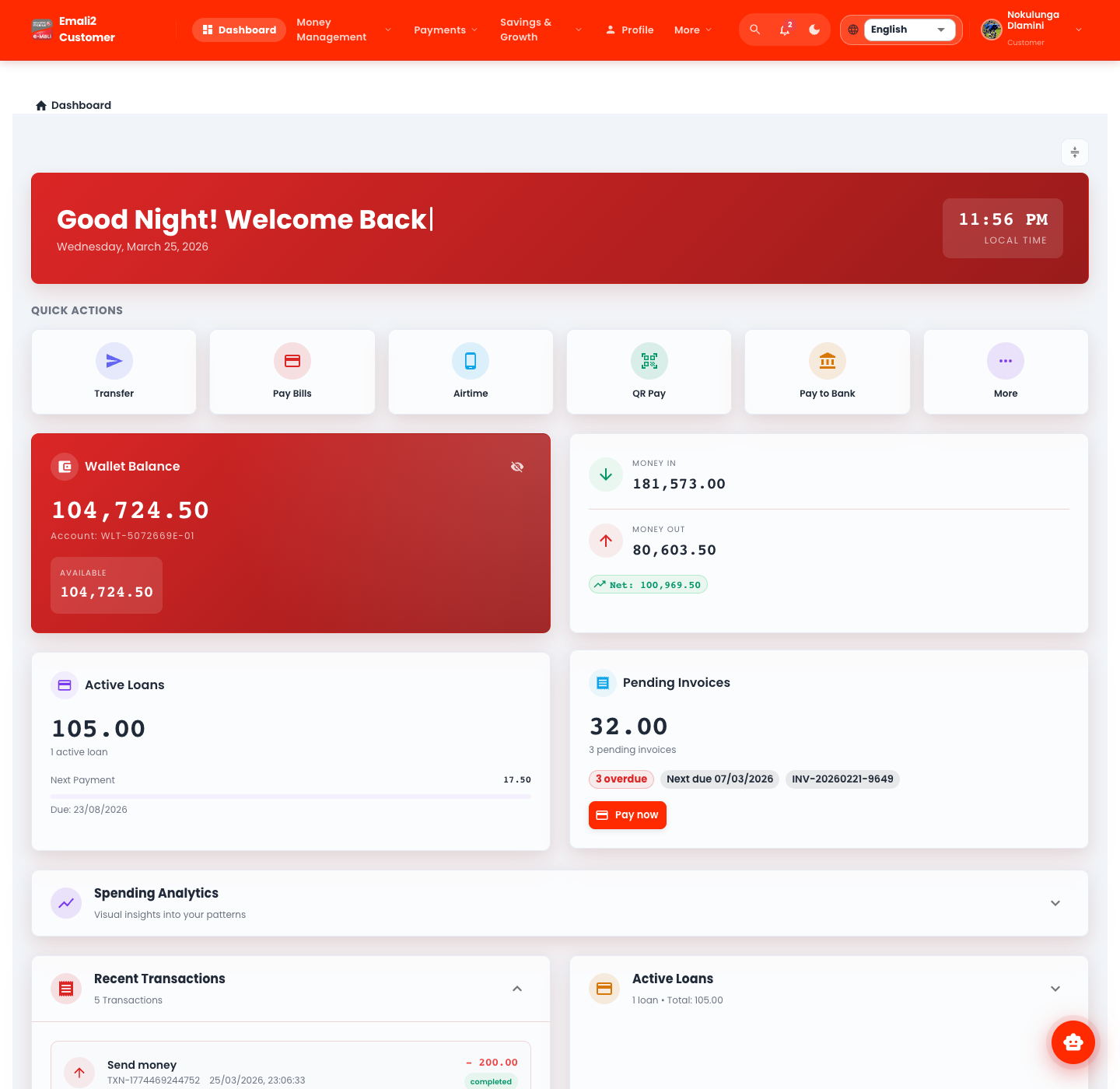
Use the dashboard as the launch point for the wallet, payments, and loan flows. The dashboard remains the safest place to verify that the customer session is healthy before investigating a downstream page issue.
Deep Dive: /app/loans
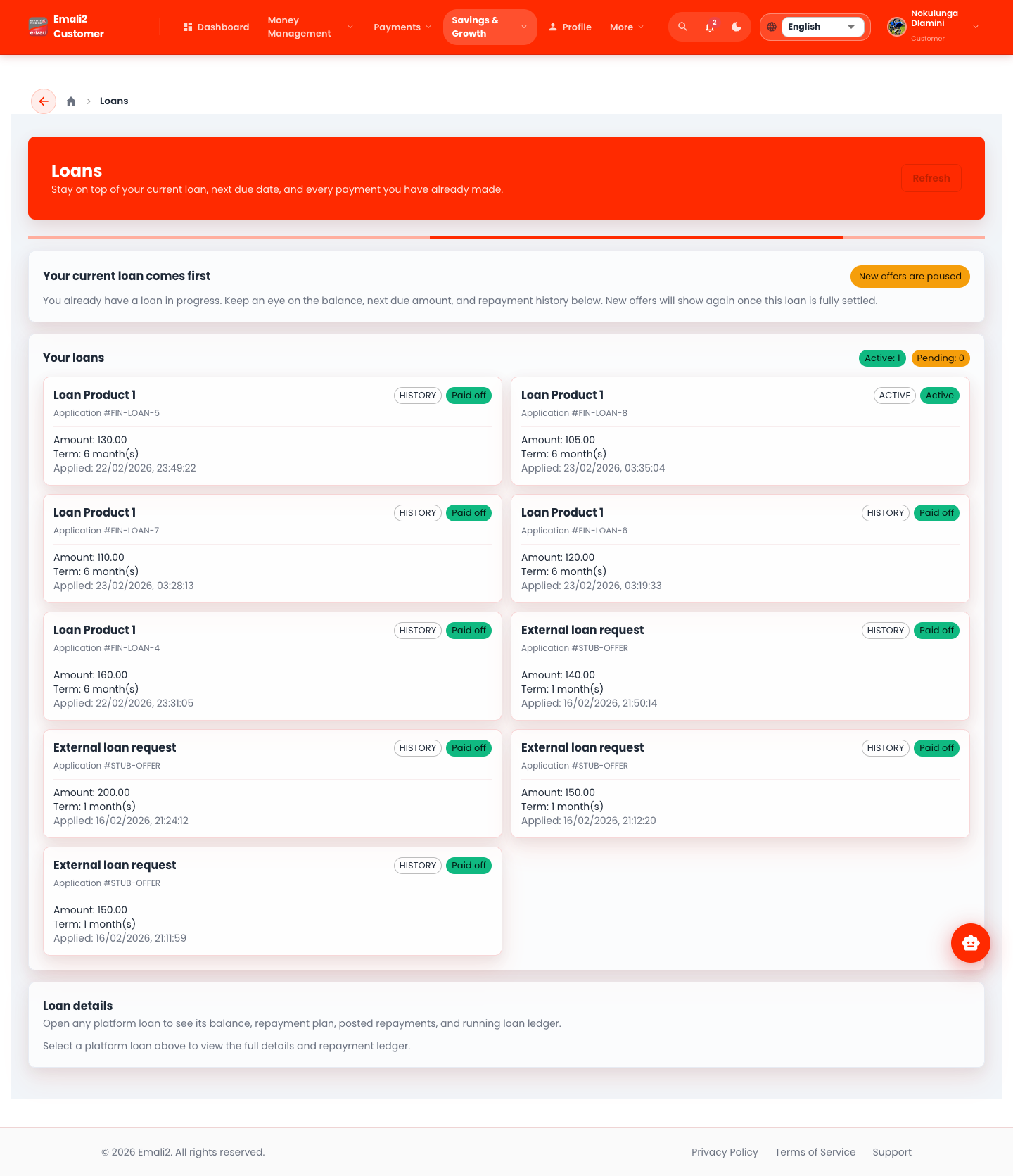
What the page now does
- Shows active and pending application counts separately.
- Treats the current live platform loan as the primary operating surface.
- Loads servicing summary, next-due context, repayment schedule, and the repayment ledger for the selected active loan.
- Requires the customer to choose the repayment wallet explicitly.
- Uses the selected wallet balance to validate whether the repayment can be posted now.
Operational Notes
- If an active platform loan exists, the page intentionally de-emphasizes new borrowing offers until the active exposure is reduced or closed.
- The repayment request can include
walletId, which makes the repayment source explicit.
- Entering more than the outstanding balance is allowed at the input level, but the platform only applies the amount still due and leaves the rest in the same wallet.
- If the selected wallet balance is too low, the page blocks the request before posting it.
Deep Dive: Route Aliases
/app/wallet
- This is a compatibility alias only.
- The canonical wallet workspace is
/app/my-wallets.
- Troubleshoot broken wallet navigation against the canonical route, not the alias.
/app/settings
- This is a profile/settings alias rather than a separate product area.
- If the route appears empty or inconsistent, compare behavior against
/app/profile.